Digital infrastructure
IKKA designs CRM and workflow infrastructure for professional firms, connecting web leads, email, WhatsApp, social channels, proposals, invoicing, payments, automation, QuickBooks and Xero.
Professional firms do not usually lose opportunities because they lack expertise. They lose them because inquiries arrive through different channels, follow-ups depend on individual staff members, proposals take too long to prepare, payment information is disconnected and management cannot easily see what is happening across the client pipeline.
IKKA designs and manages CRM and workflow infrastructure for professional firms, connecting lead intake, communication, commercial workflows, administrative operations, proposals, invoicing, payments and reporting within one structured environment.
The objective is not simply to install CRM software. It is to create an operational system around the complete client lifecycle. Our related insight, When a CRM Becomes the Operating System of a Professional Firm, explains this operating-model approach in more depth.
Potential clients may contact a professional firm through many different channels. IKKA can help connect supported sources into one structured CRM workflow. Website and landing-page entry points may also form part of a broader Professional Digital Presence strategy, while referrals from professional Partners or CitizenResident can retain their source attribution inside the CRM.
| Client channel | What enters the CRM | Operational value |
|---|---|---|
| Website & landing pages | Contact forms, consultation requests, service inquiries and campaign leads | Creates or updates structured records and can trigger intake or follow-up workflows |
| Client and prospect email communication | Keeps authorized communication history connected to the client or opportunity | |
| Supported client conversations and message activity | Reduces isolated communication on individual devices and connects conversations to workflows | |
| Social media | Supported social leads and messaging sources | Routes inquiries into lead-management and follow-up processes |
| Referral & Partner leads | Referral source, originating Partner and requested service | Supports attribution, routing and assignment to the correct service, team member or professional |
IKKA structures opportunity pipelines around the way the organization actually works. Once a lead becomes a client, those workflows can also support the coordinated experience provided through Client Intake & Premium Support. A typical professional-service workflow may include:
New Inquiry → Initial Review → Qualified Lead → Consultation Scheduled → Consultation Completed → Proposal Prepared → Proposal Sent → Awaiting Client → Engagement Accepted → Payment Pending → Active Client → Service in Progress → Completed / Ongoing Relationship
Different services can use different pipelines. A law firm, accounting firm, corporate-services provider, relocation specialist or real estate professional may each require a different workflow.
IKKA builds the CRM around the actual commercial and administrative process of the organization.
CRM infrastructure can reduce repetitive administrative work by standardizing the preparation of:
quotation drafts;
proposals;
service descriptions;
engagement summaries;
pricing structures;
recurring terms;
client details;
payment instructions;
contracts;
onboarding communication.
Where supported, information already stored in the CRM can be reused across documents. Client details, selected services, responsible professionals, pricing and conditions can flow into structured proposal and billing workflows, while final review remains with the authorized team.
The value of CRM infrastructure increases when the system can react automatically to client activity.
create or update the CRM contact;
create an opportunity;
identify the lead source;
assign the responsible person;
send an acknowledgment;
generate a follow-up task;
alert the relevant team.
update the opportunity stage;
create calendar events;
send confirmations and reminders;
notify the responsible professional;
trigger intake requirements.
move the opportunity to the appropriate stage;
schedule follow-up tasks;
notify the responsible team member;
trigger reminders if the client does not respond.
update CRM status;
start onboarding;
generate document requests;
create internal tasks;
assign professionals or coordinators.
update payment status;
notify the team;
move the client to the next workflow stage;
activate service-related tasks;
trigger confirmation communication.
staff reminders;
client reminders where appropriate;
renewal workflows;
overdue-item escalation;
recurring administrative tasks.
A modern professional-services CRM should not stop at “proposal accepted.” IKKA can help structure the complete commercial workflow:
Lead → Opportunity → Consultation → Proposal → Agreement → Invoice → Payment → Onboarding → Service Delivery
Depending on the selected technology, this may include invoice creation, deposits, payment links, installment workflows, recurring billing, reminders, partial-payment tracking, invoice status, paid/unpaid automation, internal payment notifications and activation of subsequent workflows.
Where supported by the relevant provider, IKKA may integrate CRM workflows with payment gateways or payment-link systems.
This can create a more direct path from proposal accepted → invoice → payment → service activation, reducing the need to manually check several disconnected systems.
Gateway availability, settlement conditions, fees, compliance requirements and functionality depend on the selected provider and jurisdiction. IKKA structures the operational integration but does not act as the payment institution.
One of the most common inefficiencies in professional firms is entering the same client and billing information into several systems. Where technically supported, IKKA can help connect CRM and billing workflows with accounting platforms such as QuickBooks and Xero.
The exact integration depends on the selected platform, plan, permissions and supported APIs. Final accounting treatment, reconciliation, tax classification and professional accounting decisions remain the responsibility of the firm’s accountant or CPA.
Professional firms often spend significant time collecting information before a lawyer, accountant, adviser or specialist can begin meaningful work. IKKA can structure onboarding workflows involving:
client questionnaires;
service-specific forms;
identification information;
document checklists;
document requests;
missing-document reminders;
client segmentation;
internal administrative review;
provider assignment;
consultation preparation;
recurring compliance updates.
Where technically appropriate, AI-assisted tools may support routine administrative work such as draft follow-up emails, draft client messages, conversation summaries, preliminary intake summaries, inquiry classification, internal case summaries, suggested next actions and draft service descriptions.
Human review remains essential. AI-assisted workflows are designed to improve administrative efficiency, not replace professional judgment.
Professional firms increasingly work within broader networks. IKKA can structure CRM infrastructure to track:
originating Partner;
executing Partner;
referral source;
assigned professional;
service category;
commercial owner;
referral status;
revenue attribution;
commission-related workflows where applicable;
cross-service opportunities;
Partner reporting.
Some clients require several professional services at the same time. The CRM can help separate responsibilities between client coordinators, attorneys, CPAs, financial advisers, real estate professionals, administrative support teams and other providers while maintaining one broader operational view of the client relationship.
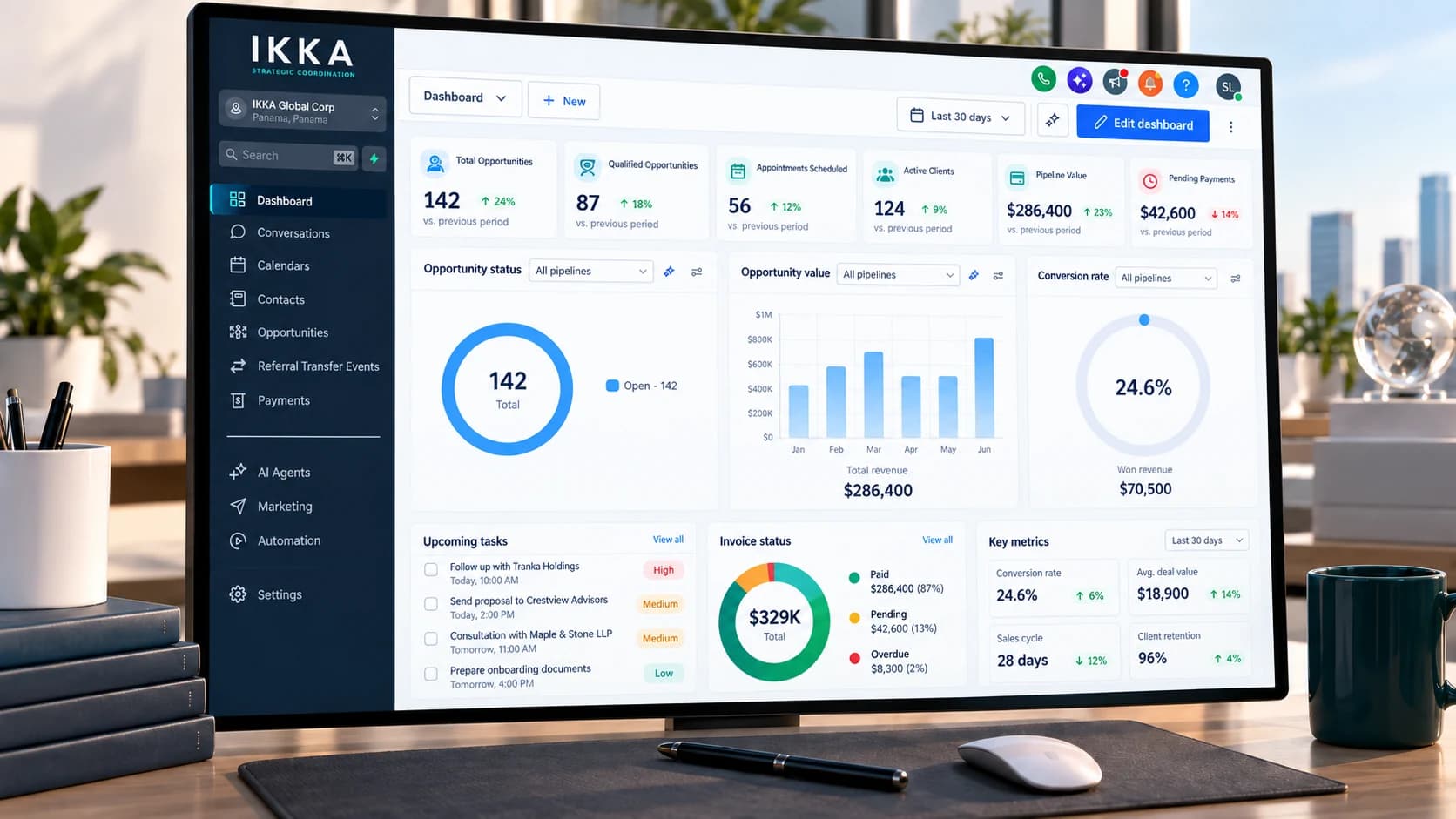
A structured CRM can provide management with clearer visibility into:
new leads and lead sources;
open opportunities and pipeline value;
consultation status;
proposals issued and awaiting response;
active clients;
invoices issued;
payments received;
outstanding invoices;
referral activity;
service categories;
responsible team members;
client status and recurring activity.
The objective is to help management understand where opportunities come from, where they are being lost, which services generate demand, which follow-ups are overdue and what requires attention.
The same infrastructure can support different professional-service models, but the pipeline, responsibilities and reporting should reflect how each organization actually operates.
| Professional context | Typical CRM use | Operational focus |
|---|---|---|
| Law firms | Inquiries, consultations, proposals, engagement workflows, documents and invoices | Administrative matter follow-up and clearer handoffs |
| Accounting & CPA firms | New leads, onboarding, recurring clients, document requests and billing | Recurring workflows and accounting-system connections |
| Corporate service providers | Company-formation leads, maintenance and annual obligations | Long-term client follow-up and recurring requirements |
| Immigration & relocation professionals | Inquiries, family information, documents and appointments | Client communication and milestone coordination |
| Real estate & investment professionals | Qualification, property-related opportunities and referrals | Opportunity tracking and multi-provider workflows |
| Professional networks | Lead origination, Partner assignment and referral attribution | Execution visibility and Partner reporting |
A CRM should not create more work for professionals. It should allow them to spend more time on the work clients actually hire them to perform.
Reduce administrative friction: less repetitive data entry and clearer task ownership.
Improve response time: new inquiries can be routed and followed up more consistently.
Increase commercial visibility: management can see opportunities before they are forgotten.
Improve the client experience: communication, proposals, invoices and next steps become more structured.
Support growth: new staff, additional services and Partner relationships can be incorporated into an existing framework.
Protect professional focus: operational systems support expertise rather than forcing professionals to manage every administrative detail themselves.
1. Business & Workflow Review
IKKA analyzes how leads arrive, how clients are qualified, how proposals are prepared, how payments are collected and how work is handed off internally.
2. Process Mapping
The intended client journey and operational responsibilities are defined before automation begins.
3. CRM Architecture
Pipelines, users, fields, service categories, permissions, opportunities and client records are configured.
4. Channel Connections
Website forms, email, WhatsApp and supported social or communication channels are integrated where technically available.
5. Commercial Infrastructure
Proposal, contract, invoice and payment workflows are configured.
6. Automation
Notifications, tasks, reminders, lead routing and other workflow triggers are implemented.
7. Accounting & External Integrations
QuickBooks, Xero, payment gateways or other supported systems may be connected according to the approved scope.
8. Testing
The complete client journey is tested before launch.
9. Team Adoption
The organization receives practical guidance so the CRM becomes part of the real daily workflow.
10. Ongoing Optimization
The system can evolve as the firm adds services, employees, Partners or new business processes.
Buying software does not create an operational system. The real value comes from connecting technology, workflows, people, commercial processes and client experience.
IKKA focuses on that connection and designs CRM infrastructure around how professional firms actually operate — from the first inquiry through payment, professional handoff and ongoing client support.
Depending on the selected technology stack and available integrations, IKKA may connect workflows involving websites and landing pages, email, WhatsApp, social channels, calendars, document systems, electronic signatures, payment gateways, QuickBooks, Xero, CMS platforms, CitizenResident and third-party APIs.
Integration availability depends on the relevant platforms, plans, permissions, APIs and jurisdictions.
CRM automation supports professional work. It does not perform the professional role itself.
Professional firms remain responsible for determining their applicable requirements concerning confidentiality, access permissions, client consent, record retention, data protection, professional engagement and final professional review. IKKA develops and operates the administrative and technology infrastructure around those requirements.
Common questions answered before your consultation.
Yes. IKKA focuses on workflows where client intake, professional services, proposals, documents, invoicing, payments and ongoing follow-up need to work together.
A firm’s website can act as an entry point into the CRM through contact forms, consultation requests, service inquiries and other structured lead sources. IKKA’s Professional Digital Presence service can be designed to support those CRM-connected client journeys.
Yes. CRM workflows can continue beyond sales to support onboarding, document follow-up, tasks, communication, payments and status visibility. This can complement Client Intake & Premium Support for more complex client engagements.
Yes, in most supported environments. Website forms and landing pages can be connected to lead and opportunity workflows.
Where the website itself also needs to be structured around inquiry capture, Professional Digital Presence can support the website, forms and service-page layer feeding those workflows.
Potentially yes. Available functionality depends on the WhatsApp configuration, CRM platform, provider, permissions and supported integrations.
Yes, where supported by the connected email and CRM systems.
Depending on the selected platform, CRM workflows may support proposal drafting, contracts, invoice generation and payment tracking.
Yes, where the relevant payment gateway provides a supported integration, API or connector.
Where technically supported, IKKA can configure workflows connecting client, invoice and payment information with QuickBooks.
Yes, where supported by Xero, the CRM and the selected integration environment.
Yes. CRM permissions can be structured according to role, department, Partner relationship or operational responsibility.
Yes. Referral source, originating Partner, assigned professional and related commercial information can be structured within the CRM.
For Partner-routing and referral workflows connected with the CitizenResident ecosystem, see CitizenResident - Partner Integration.
Schedule your initial consultation and let us guide you through the process. We respond within 1 business day.
Request a Consultation